⚡ Quick Summary: Is This a Real Windows Error?
No. This is not an official Windows alert.The pop-up is scareware generated by an unwanted program called Smart Printer Driver Utility (SmartPrinterDriverUtility.exe / AdoreSoftwares.DriverUpdaterProApp). It generates a full-screen black canvas to simulate a system lockout and scare you into clicking “Fix Now” or calling fake technicians. Do not enter payment details or grant remote access.
If you are reading this on your phone because your Windows 11 or Windows 10 desktop has suddenly turned pitch black behind a large “Printer Driver Error” dialogue box, take a breath: your files are safe.
Users across the UK are encountering an aggressive scareware app that takes over the screen, hides open windows, and deliberately omits a close (X) button, locking up the computer or laptop.
What Does the Fake Error Screen Look Like?
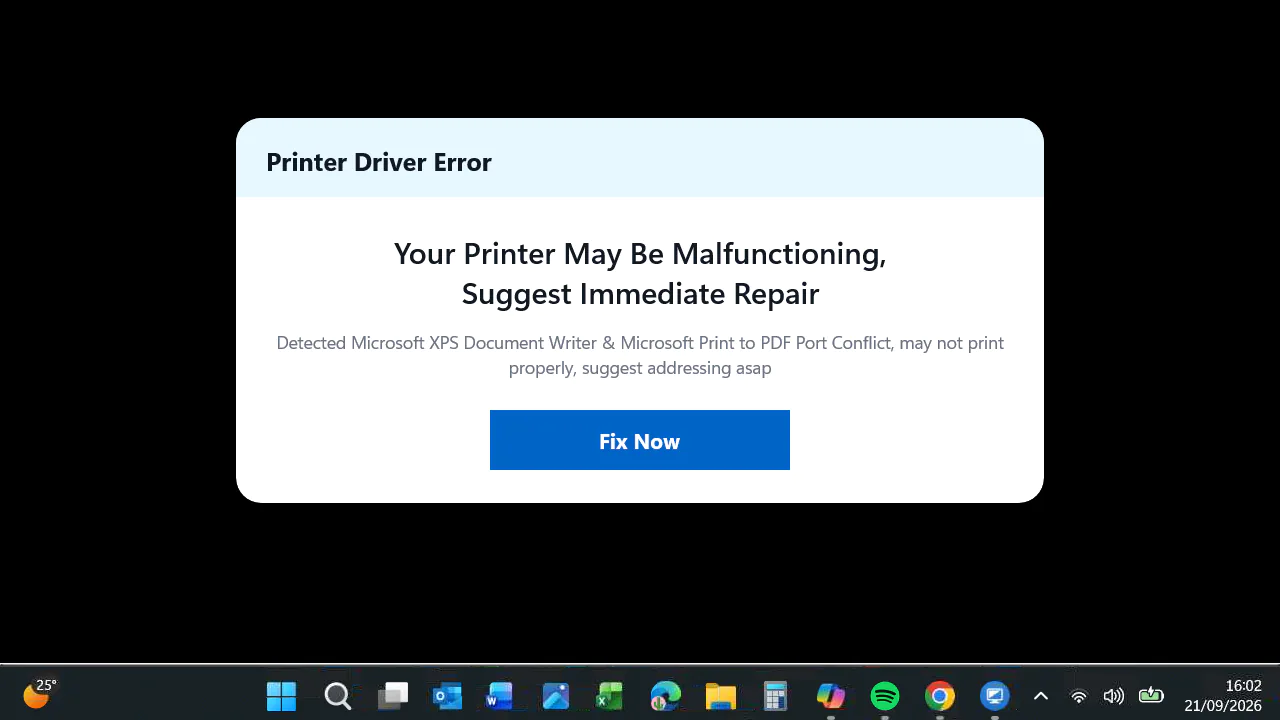
The application draws a pitch-black background over your entire desktop, leaving only the taskbar visible, and displays an alert with the following text:
Printer Driver Error
Your Printer May Be Malfunctioning,
Suggest Immediate RepairDetected Microsoft XPS Document Writer & Microsoft Print to PDF Port Conflict, may not print
properly, suggest addressing asap[ Fix Now ]
Why Can’t You Close It or Open Task Manager?
Although your Windows taskbar is still visible at the bottom of the screen, launching applications like Task Manager, Settings, or Command Prompt will appear to do nothing.
The programs are opening, but the rogue software has set itself to “Always on Top” over an opaque black window. Even switching to a new Windows Virtual Desktop will not escape it.
How to Bypass the Black Screen and Remove the Utility
Because you cannot click behind the black window, you will need to use keyboard shortcuts to bypass it. Follow these steps:
Step 1: Force-Close the Screen Using the Run Command
- Press Windows Key + R simultaneously on your keyboard to open the Run dialogue box.
- In the box, type or paste the following command exactly:
cmd /c taskkill /f /im SmartPrinterDriverUtility.exe - Press Enter.
- The black screen and the pop-up should vanish immediately, restoring visibility to your desktop.
Step 2: Uninstall the Rogue Software
Terminating the process stops the visual block, but the program will restart automatically the next time you turn on your PC. You must remove the underlying package:
- Open Windows Settings (Windows Key + I).
- Go to Apps → Installed apps (or Apps & features).
- In the search bar, look for:
- Smart Printer Driver Utility
- Driver Updater Pro
- Adore Softwares
- Click the three dots (…) next to the app and select Uninstall.
🛑 Stuck or Uncomfortable Running Commands?
If your screen is still blocked or you are worried about rogue software lingering in the background, our UK-based remote engineers can connect and clean your system safely.
Direct UK Phone Support:
- Fixed-Fee Cleanup: Fast, secure remote sessions completed within 20 minutes.
How Did This Get Onto Your PC?
The exact installation route can vary.
Software of this type may be installed after someone:
- searches online for help with a printer problem;
- follows an advertisement for printer or driver support;
- installs a printer utility they believe is official software;
- follows a link to an app in the Microsoft Store;
- receives remote assistance from an unknown or untrusted support provider.
Note: Features like Microsoft Print to PDF and Microsoft XPS Document Writer are legitimate, built-in Windows components. They do not cause printer conflicts, and their presence is completely standard.
Critical Post-Removal Checklist
Once the software is removed, take these three security precautions:
- Check for Unknown Remote Access Tools:
Open your Installed Apps list again. Look for tools like AnyDesk, UltraViewer, TeamViewer, or ConnectWise. If you did not install these for an authorised IT provider, uninstall them immediately. - Run a Full Microsoft Defender Scan:
Go to Settings → Privacy & Security → Windows Security → Virus & threat protection → Scan options → select Full scan and click Scan now. - Do Not Call Numbers Given in Pop-Ups:
Never ring telephone numbers displayed inside unsolicited browser alerts or system pop-ups. Official vendors like Microsoft, HP, or Epson will never lock your screen behind a full-screen scareware prompt.
Frequently Asked Questions (FAQ)
Is Smart Printer Driver Utility a virus?
Technically, it is categorised as a Potentially Unwanted Program (PUP) or scareware. It does not encrypt files like ransomware, but it employs deceptive, disruptive tactics—such as screen-locking and fabricated error messages—to push unnecessary paid software or support services.
Will restarting my PC fix the black screen?
Usually, no. The utility configures itself to launch on Windows startup. While restarting in Safe Mode will prevent it from running temporarily, restarting normally will usually bring the black screen and error prompt straight back.
What should I do if my printer still doesn’t print?
Because the pop-up itself is fabricated, your actual printer issue (if you had one to begin with) is likely unrelated. Visit the official manufacturer website (e.g., support.hp.com or epson.co.uk) directly to install genuine drivers, or contact us for assistance configuring your network printer.